Life360: Family Safety & GPS
- 4.8
- Rating
- 100.00M
- Installs
- Free
- Price

 Analysis by App-foxy
I started using Life360: Stay Connected & Safe as a practical family coordination tool rather than as another chat app. That distinction matters. Its main value appears when several people need a shared view of whereabouts, travel progress, and safety events without constantly sending “Where are you?” messages. Life360, developed by Life360, sits in the lifestyle category and is free to install, with optional in-app purchases ranging from $1.49 to $249.99 per item.
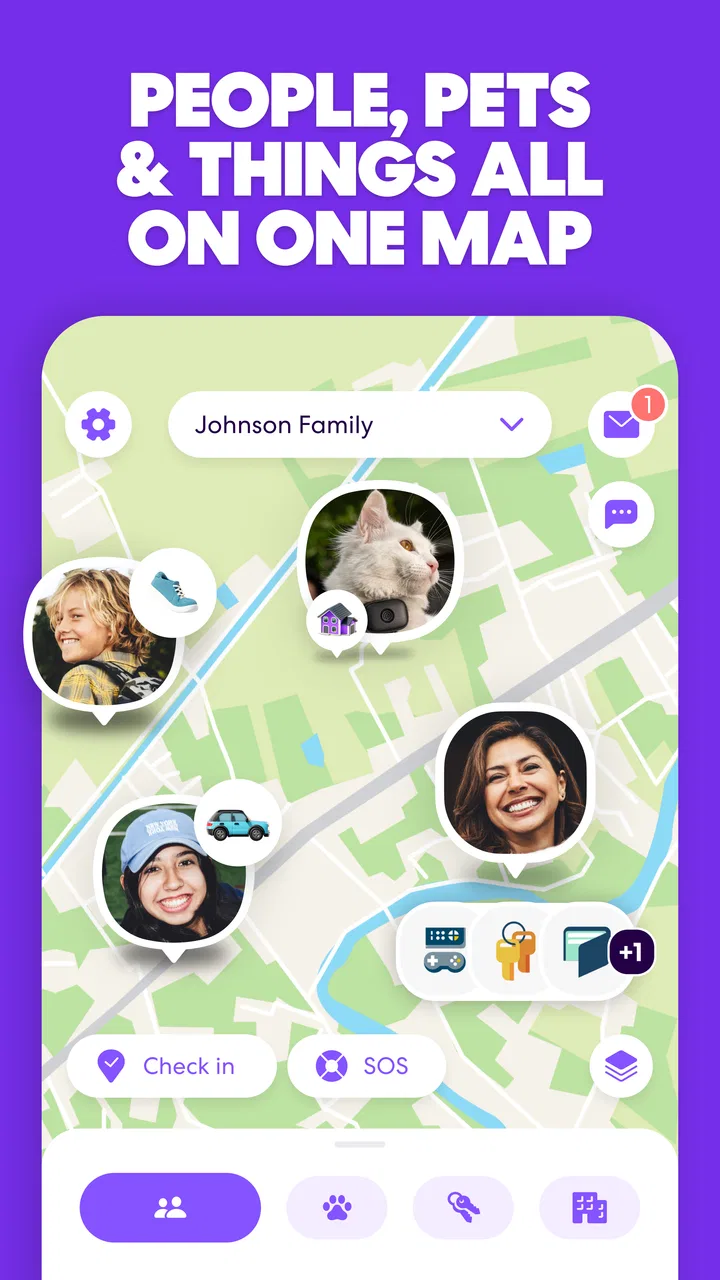
My first impression was that the app is built around a simple promise: keep the people in a chosen group connected in one place. The experience brings together location sharing, crash alerts, and driving-related reports, so it feels broader than a basic map pin or a family messaging thread. It is rated for Everyone, runs on Android from version 10 onward, and the current version is 25.50.1. Those details make it accessible to many households, although the usefulness still depends heavily on whether everyone is comfortable sharing location information.
How I use Life360 in an ordinary week
The baseline workflow is straightforward. I would set up a shared group for the people who actually need coordination, then use the map as the first place to check before calling or texting. That works well for families with school runs, changing work shifts, regular commutes, or relatives who want a little reassurance without a constant conversation.
You May Also Like

 Blood Strike: 2.5 Anniversary
Blood Strike’s Loadouts Turn Every Drop Into a Tactical Gamble
A close look at Blood Strike’s custom loadouts: how fast access to signature weapons reshapes its battle royale rhythm, rewards preparation, and narrows the gap between fights.

 Pandora - Music & Podcasts
Pandora’s Music Is Easy to Start, but Harder to Recover
Pandora’s strength is its low-effort path from a seed to a station. Its weak spot is how much confidence it asks you to place in connection, setup, and quiet recovery.

 8 Ball Pool
8 Ball Pool Is Built on Rivalries, Rematches, and Routine
A close look at the rivalries, rematches, shared routines, and unanswered safety questions that turn a quick pool match into a persistent mobile community.

 Samsung Music
Samsung Music’s Quiet Strength Is Playing What You Already Own
Its reach comes less from spectacle than from dependable access to a personal library. That simplicity is both the app’s strongest retention engine and its ceiling.

 AccuWeather: Weather Radar
AccuWeather Review: A Quick, Clear Forecast for Everyday Decisions
For everyday plans, the best forecast is the one you can understand quickly. AccuWeather makes rain timing, radar, and local conditions easy to act on, with a few trade-offs.

 Hill Climb Racing
Why Hill Climb Racing Still Turns Crashes Into One More Run
A tiny car, a bumpy hill and one more upgrade: Hill Climb Racing keeps resurfacing because its simple chaos makes every near-miss feel personal.
More From Our News Desk



A realistic example is an evening pickup. One person is leaving work, another is waiting after an activity, and the timing is uncertain because traffic changes. Instead of exchanging several updates, the group can check the shared location and decide whether to wait inside, start walking, or make a call. The important benefit is not that the map replaces communication; it removes unnecessary messages when the situation is routine.
I also found the app more useful when I treated it as a habit rather than an emergency button. Checking the map before leaving, looking at the expected travel progress during a pickup, and reviewing a driving report afterward creates a repeatable rhythm. That is more dependable than opening the app only after somebody is already worried.
The location-sharing model is especially helpful for households with different schedules. Parents can coordinate with teenagers, adult children can keep track of an older relative, and roommates can use the same basic idea for practical reasons such as knowing whether someone has arrived home. Still, I would not use it as a substitute for a direct conversation about plans. A location dot can show where a device is, but it cannot explain why a person has stopped, changed direction, or chosen not to answer.
That is one of the first habits I recommend: agree on what the shared location means before inviting everyone in. If the group treats every pause as a crisis, the app can create more anxiety than it removes. If everyone understands that it is mainly for coordination and reassurance, the map becomes much less intrusive.
What the main features feel like in practice
Location sharing is the everyday foundation. It is the part I would expect to use most often, especially for pickups and journeys. Crash alerts and driver reports add a safety-oriented layer, but they serve different purposes. A crash alert is associated with a serious incident that may require attention, while a driver report is more useful for reflecting on driving patterns after a trip. Keeping those roles separate helps prevent the app from becoming a source of constant notifications.
The driving side is not equally valuable for every user. Someone who drives frequently, shares a vehicle, or wants a clearer picture of their habits may appreciate it. Someone who rarely drives or dislikes any form of driving feedback may see it as unnecessary. I would decide based on the household’s actual routine rather than selecting every available option simply because it is present.
Life360 has become widely adopted, with more than 100 million installs and an average rating of 4.4 from around 2.1 million ratings. That scale suggests it has become a familiar choice for family location sharing, but popularity does not remove the need to configure it thoughtfully. A large user base can make an app feel trustworthy, yet the day-to-day experience still depends on phone settings, battery behavior, connectivity, and group expectations.
Settings I would check before inviting everyone
The most important preparation is not flashy. I would review the phone’s location and battery settings, then make sure the app can operate consistently enough for the household’s needs. If a phone restricts background activity too aggressively, a location may appear stale or update less reliably. That is not a reason to promise perfect tracking; it is a reason to test the setup before depending on it.
I would also check notification choices carefully. Safety-related alerts deserve a different level of attention from ordinary movement updates. If every small change produces noise, people may start ignoring the notifications that matter. A calmer setup usually works better: keep meaningful safety events visible, while using the map for routine checking instead of expecting an alert for every movement.
Another worthwhile setting decision is deciding who belongs in each shared group. A large circle can be convenient, but it can also expose more location information than necessary. I prefer a smaller, purpose-based arrangement: the people involved in daily coordination together, and other relatives included only when there is a clear reason. This is a practical privacy habit, not just an organizational preference.
Before relying on crash alerts, I would make sure everyone understands what they are for and what they are not. An alert should prompt people to check in and respond appropriately, but it should not be treated as proof that every incident will be recognized or that emergency help is automatically replacing human judgment. The app can support a safety plan; it should not be the entire plan.
For drivers, I would review the reports when calm rather than during an argument. A record can be useful for spotting habits, but it becomes counterproductive if people use it to monitor one another constantly. The best use I found is reflective: look for a pattern, discuss it, and agree on a reasonable change. That approach makes the feature more constructive than simply pointing at an isolated event.
Shortcuts and repeatable patterns that save time
Experienced use comes from reducing the number of decisions people have to make. I would establish a simple rule that the map is checked first for routine “Where are you?” questions, while a direct call is used when timing is urgent or something seems wrong. This prevents the group chat from filling with updates and gives everyone a shared understanding of which channel to use.
For regular journeys, the same pattern can be repeated: check the person’s position before leaving, glance at progress near the expected arrival window, and contact them directly if the situation no longer matches the plan. This is faster than repeatedly opening several conversations, and it avoids treating a location display as a complete explanation of someone’s trip.
I would also create a household agreement about when location sharing is expected and when people can pause it. The exact agreement will differ between a parent and teenager, partners, adult relatives, or roommates. What matters is clarity. Without that conversation, the app can feel like surveillance to one person and like basic safety to another.
A useful non-obvious trade-off is that more information does not always produce more safety. If several people receive every driving update, every location change, and every possible notification, attention gets diluted. I prefer assigning attention according to responsibility: the people who genuinely need a safety alert should receive it, while others can rely on the shared map when appropriate.
Another practical pattern is to use the app before a trip rather than only during it. Confirming that the relevant people are in the intended shared group, checking that the phone is online, and making sure everyone knows who to contact if something goes wrong can prevent confusion later. These steps take little time, but they are more valuable than discovering a setup problem during an unexpected delay.
Where the app is strong—and where it becomes uncomfortable
The strongest part of Life360 is its combination of family location sharing and safety-focused tools. A map alone is useful, but the addition of crash alerts and driving reports gives the app a broader purpose. I can see why it appeals to families that want one central place instead of combining a mapping app, a messaging service, and separate safety tools.
It is also more approachable than building a coordination system from ordinary alternatives. A group chat can handle messages, and a map service can share a position, but those tools often leave the family to decide how everything fits together. Life360 is designed around the household relationship itself, which reduces the amount of improvisation needed for common situations.
On the other hand, a group chat is better when the main need is conversation rather than location. If your family only needs to announce dinner plans or share occasional updates, Life360 may feel heavier than necessary. A basic map-sharing feature can also be preferable for a one-off journey, especially when you do not want an ongoing shared arrangement.
Privacy is the most important limitation to consider. The app’s usefulness depends on people sharing location, and some users will reasonably decide that this is too intrusive. I would not recommend pressuring a partner, teenager, friend, or relative into using it. A safety tool works best when the people involved understand the arrangement and have a voice in how it is used.
There is also the practical limitation of relying on phones. Battery conditions, connectivity, device settings, and user behavior can all affect how current the information appears. For that reason, I would never use the map as the sole method for confirming that someone is safe. A direct call, a prearranged check-in, or local emergency assistance may be more appropriate when the situation is genuinely urgent.
Who should use it, and who should choose something simpler
I think Life360 is a strong fit for families with recurring coordination problems. It makes particular sense when several people travel independently, when pickups change frequently, or when a household wants driving and crash-related tools alongside location sharing. The free starting point also makes it easy to test the basic workflow before deciding whether optional purchases are worthwhile.
The app may also suit people caring about an older relative, provided the arrangement is respectful and everyone understands the boundaries. In that situation, the value is reassurance and coordination, not watching every movement. A smaller group and a clear check-in plan can make the experience feel supportive rather than controlling.
I would suggest skipping it if your household dislikes persistent location sharing, rarely needs coordination, or already has a simple system that everyone uses reliably. Adding another app will not improve a routine that is already working. It may also be a poor fit if the main goal is private, one-time location sharing rather than membership in an ongoing family group.
Cost is another point to consider. The app itself is free, but optional in-app purchases can range from $1.49 to $249.99 per item. I would begin with the basic experience and identify a specific problem before paying for anything. A feature is worth considering only when it solves a recurring need for your household, not merely because it appears in the upgrade path.
My final view after settling into the workflow
Life360 works best when it is treated as a shared safety and coordination system, not as a remote-control panel for other people. The map can reduce needless messages, crash alerts can add another layer of awareness, and driver reports can support useful conversations about habits. Those strengths are real, but they depend on sensible settings and mutual agreement.
The app has been available since April 7, 2010, and its broad adoption is understandable: it gathers several family-oriented functions into one recognizable routine. I appreciate that it can serve both ordinary moments, such as arranging a pickup, and more serious situations, such as responding to a potential crash alert. At the same time, I would keep expectations realistic and maintain a backup plan for urgent communication.
My recommendation is therefore specific rather than universal. If your household regularly asks where people are, coordinates multiple journeys, or wants driving and safety information in the same place, Life360 is worth trying. Set up a small group, adjust notifications, test the location behavior, and agree on privacy boundaries before making it part of daily life. If you want occasional messaging or a single shared map pin, a simpler alternative will probably feel less intrusive.
After those choices are made, the app becomes much easier to live with. The real advantage is not watching more closely; it is coordinating with less friction. That is why I would recommend it to the right household, while being equally comfortable telling privacy-first users or very occasional users to choose a lighter tool.
FAQs for Life360: Family Safety & GPS
01What is Life360 and how does it work?
Life360 is a family networking app designed to help users stay connected and safe. It utilizes GPS tracking to provide real-time location updates of family members. Users can create private ‘Circles’ for specific groups and receive notifications about members' arrivals and departures from designated places.
02Is Life360 free to use, and are there any premium features?
Life360 offers a free version with basic location tracking and alerts. However, it also provides premium subscriptions that include additional features such as crash detection, roadside assistance, and advanced location history. These premium plans enhance safety and connectivity but come at a monthly or annual cost.
03How does Life360 ensure user privacy and data security?
Life360 prioritizes user privacy by allowing users to control who can see their location within the app. Data transmission is encrypted, and only approved Circle members can access location information. Users can adjust location-sharing settings to suit their privacy preferences, ensuring control over personal data.
04Can Life360 be used on both Android and iOS devices?
Yes, Life360 is available for both Android and iOS platforms. It can be downloaded from the Google Play Store and the Apple App Store. The app offers cross-platform compatibility, allowing seamless interaction and location sharing between users on different operating systems.
05What kind of support does Life360 offer in case of issues or emergencies?
Life360 provides in-app support and a comprehensive FAQ section for troubleshooting common issues. Premium users have access to enhanced support features, including 24/7 emergency dispatch and roadside assistance. These services aim to offer peace of mind and quick help when needed.
Pros
- Real-time location sharing enhances security.
- Crash detection alerts emergency contacts instantly.
- Family chat feature keeps everyone in touch.
- Location history helps track past movements.
- Geofencing notifies when loved ones arrive safely.
Cons
- Some features require a premium subscription.
- Battery consumption can be significant.
- Location accuracy can occasionally fluctuate.
- Privacy concerns with constant tracking.
- Notifications can become overwhelming.

Life360: Family Safety & GPS
Gallery